If you’ve ever glanced at your iPhone and spotted “IMSG” in a text thread, a settings menu, or a tech forum post, you’ve probably paused and wondered what it actually means.
The good news is that it’s not some hidden feature or mysterious code. IMSG is simply shorthand for iMessage, Apple’s built-in messaging service that comes standard on every iPhone, iPad, Mac, and Apple Watch.
Understanding what IMSG means matters more than you might think. It affects how your messages are sent, whether they’re encrypted, how much data they use, and even why some text bubbles turn blue while others stay green.
In this guide, we’ll break down exactly what IMSG stands for, how it differs from regular text messaging, its key features, and what to do if it’s not working the way it should on your device.
Quick Answer: IMSG = iMessage
In short: IMSG is an abbreviation for iMessage. It’s the shorthand people use especially in texts, forums, and tech support conversations to refer to Apple’s proprietary messaging platform without typing out the full word every time.
iMessage itself is the messaging service built into the Messages app on Apple devices. When you send a text from your iPhone to another Apple user, and both of you have an active internet connection, that message is automatically routed through Apple’s servers as an iMessage rather than through your carrier’s traditional SMS network. You’ll know it worked because the text bubble turns blue instead of green.
The abbreviation “IMSG” isn’t an official Apple term; you won’t find it printed anywhere in iOS settings or on Apple’s support pages. Instead, it’s grown organically out of everyday digital communication, the same way people shorten “text message” to “text” or “direct message” to “DM.” You’ll most commonly come across it in casual conversations, online troubleshooting guides, and community forums where people are discussing messaging issues or asking questions about their Apple devices.
What Is iMessage? (Background)
To fully understand IMSG, it helps to know the story behind iMessage itself. Apple introduced iMessage in 2011 alongside iOS 5, at a time when SMS text messaging was still limited by character counts and often came with per-message carrier fees. Apple designed iMessage as a modern alternative one that used internet data instead of the cellular messaging network, allowing users to send unlimited texts, photos, videos, and other files at no extra cost beyond their existing data or Wi-Fi plan.
Since its launch, iMessage has become a core part of the Apple ecosystem rather than a standalone app. It’s built directly into the Messages app, meaning you don’t need to download anything separate to use it if you own an iPhone, iPad, Mac, or Apple Watch, iMessage is already there, ready to activate with your Apple ID.
One of iMessage’s defining traits is how seamlessly it works across devices. Start a conversation on your iPhone, and you can pick it up on your Mac or iPad without missing a beat, thanks to Apple’s Continuity feature syncing everything through iCloud. Over the years, Apple has continued expanding iMessage’s capabilities, adding features like read receipts, typing indicators, Tapbacks, and end-to-end encryption all of which distinguish it from traditional SMS and have made it one of the most widely used messaging platforms among Apple users worldwide.
Where You’ll See “IMSG” on Your iPhone
Even though “IMSG” won’t show up as an official label anywhere in your iPhone’s settings or interface, there are several everyday places where you’re likely to encounter the abbreviation.
The most common spot is in casual texting between friends or family. Someone might type “send me an image when you land” or “I’ll message you the details later,” using it as a quick, informal stand-in for “iMessage” the same way people shorten other tech terms in everyday conversation.
You’ll also run into it frequently on tech support forums, Reddit threads, and troubleshooting guides. When users are trying to describe an issue like messages not sending, bubbles showing the wrong color, or iMessage failing to activate they’ll often write “imsg” to save time while discussing the problem with others or searching for a fix online.
Additionally, “IMSG” sometimes appears in app logs, network diagnostic tools, or technical documentation where space is limited and abbreviations are standard practice. If you’re troubleshooting connectivity issues or looking at detailed device reports, you might spot it there as a compact reference to the iMessage service running in the background.
IMSG vs. SMS/MMS: Key Differences
One of the most practical reasons to understand IMSG is knowing how it differs from traditional SMS and MMS messaging differences that directly affect your experience every time you send a text.
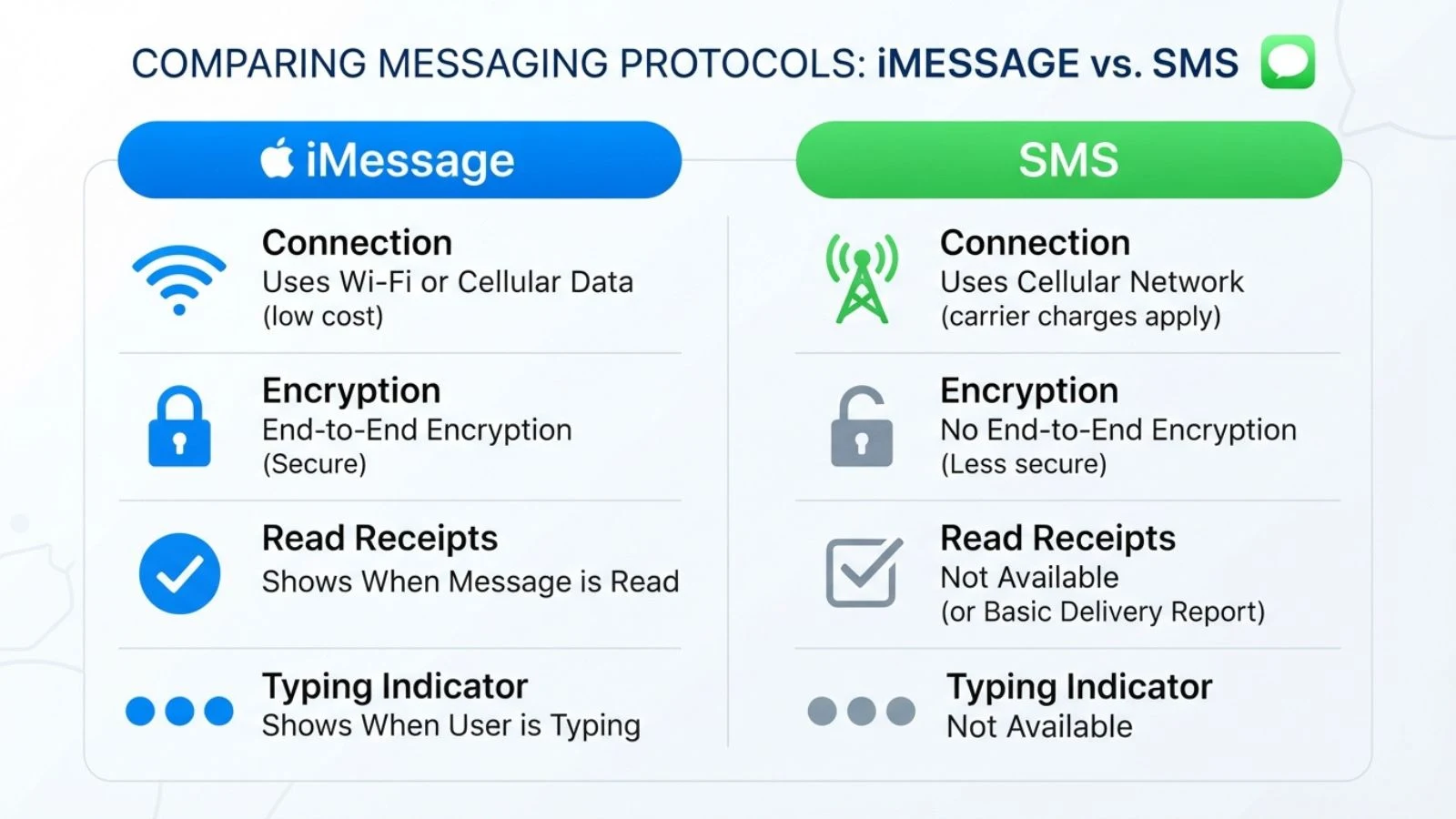
The biggest distinction is how each service transmits messages. IMSG (iMessage) sends data over the internet using Wi-Fi or cellular data, while SMS and MMS rely on your carrier’s traditional cellular network. This is why iMessage doesn’t count against your carrier’s text messaging limits, but does use data if you’re not connected to Wi-Fi.
You can instantly tell which one you’re using by bubble color: iMessages appear in blue, while SMS/MMS messages appear in green. This simple visual cue tells you whether your message went through Apple’s encrypted network or fell back to a standard carrier text which typically happens when the recipient doesn’t have an Apple device or has iMessage turned off.
| Feature | IMSG (iMessage) | SMS/MMS |
| Bubble color | Blue | Green |
| Network used | Wi-Fi/cellular data | Carrier network |
| Encryption | End-to-end encrypted | Not encrypted |
| Media quality | High-resolution | Often compressed |
| Read receipts | Yes | No |
| Works with Android | No | Yes |
| Cost | Free (uses data) | May incur carrier fees |
Key Features of iMessage (IMSG)
Part of the reason iMessage has become so popular among Apple users is the range of features it offers beyond basic texting. Here’s a closer look at what sets it apart.
End-to-end encryption: Every iMessage sent between Apple devices is encrypted, meaning only the sender and recipient can read the content, not even Apple can access it.
Read receipts and typing indicators: You can see when someone has read your message and watch the three-dot bubble appear when they’re typing a reply, adding a layer of real-time context to conversations.
Tapbacks and message effects: Instead of typing a full reply, you can react to a message with a quick Tapback (like a thumbs-up or heart), or send messages with fun visual effects like confetti or fireworks for special occasions.
Group messaging: iMessage supports rich group chats where everyone can see the full conversation history, share files, and use Tapbacks even if some participants are on non-Apple devices, though features are limited in mixed groups.
High-quality media sharing: Photos and videos sent through iMessage retain much better quality than those sent via MMS, which often compresses files significantly.
Cross-device syncing: Thanks to Continuity and iCloud, conversations sync automatically across your iPhone, iPad, Mac, and Apple Watch, so you can start a chat on one device and continue it on another without losing any messages.
Requirements to Use iMessage
Before you can start sending and receiving SMS (iMessage) texts, there are a few basic requirements your device and account need to meet.
An Apple ID:
Message is tied directly to your Apple ID, which acts as your identity across Apple’s ecosystem. If you’ve ever downloaded an app from the App Store, made an iTunes purchase, or signed into iCloud, you already have one set up.
A compatible Apple device:
Message works on iPhones, iPads, Macs, and Apple Watches. As long as your device can run a reasonably recent version of iOS, iPadOS, macOS, or watchOS, iMessage should be available out of the box with no separate download required.
An internet connection:
Since iMessage relies on data rather than the cellular messaging network, you’ll need either Wi-Fi or mobile data active for messages to send and receive properly.
iMessage turned on in Settings:
In most cases, iMessage is enabled by default, but it’s worth double-checking. On an iPhone, go to Settings > Messages and make sure the iMessage toggle is switched on. You can also confirm which phone numbers or email addresses are linked to your account under Settings > Messages > Send & Receive.
Common Alternate Meanings of “IMSG”
While IMSG almost always refers to iMessage in the context of iPhones and Apple devices, it’s worth knowing that the abbreviation can carry a slightly different meaning depending on where you encounter it.
In broader, more casual texting culture, some people use “imsg” as informal shorthand for “instant message” in general not tied to any specific platform or brand. In this looser sense, someone might say “I’ll image you later” simply to mean they’ll send a quick message, regardless of whether that’s through iMessage, WhatsApp, Facebook Messenger, or any other chat app. This usage tends to show up more in general online slang and social media conversations than in Apple-specific discussions.
Context is usually the easiest way to tell which meaning applies. If the conversation involves an iPhone, iPad, Mac, or Apple ecosystem topic like troubleshooting a blue bubble issue or asking about Apple ID settings IMSG almost certainly refers to iMessage. On the other hand, if it’s used in a more general chat about texting habits or across different platforms and devices, it may simply mean “instant message” as a catch-all term.
Troubleshooting: When IMSG/iMessage Isn’t Working
Even though iMessage is generally reliable, most iPhone users run into occasional hiccups. Here are the most common issues and how to fix them.
Messages showing green instead of blue:
This usually means the message was sent as SMS rather than iMessage. It can happen if the recipient doesn’t have an Apple device, has iMessage turned off, or has a poor internet connection. Check your own Wi-Fi/data connection first, since a weak signal can cause iMessage to fall back to SMS.
iMessage won’t activate:
If you see a message saying “Waiting for Activation,” try turning iMessage off and back on under Settings > Messages, restarting your iPhone, or checking your internet connection. In some cases, updating to the latest iOS version resolves activation errors.
Messages not syncing across devices:
If your texts aren’t appearing on your iPad or Mac, make sure you’re signed into the same Apple ID on all devices and that iMessage is enabled under Settings > Messages > Send & Receive on each one.
Apple ID sign-in issues:
Signing out of your Apple ID and signing back in under Settings > Messages can often resolve stubborn iMessage bugs.
Check Apple’s System Status page: Occasionally, the problem isn’t your device at all Apple’s iMessage servers may be experiencing an outage. Checking Apple’s System Status page can quickly confirm whether it’s a widespread issue rather than something specific to your phone.
Frequently Asked Questions
Is IMSG the same as iMessage?
Yes. IMSG is simply an informal abbreviation for iMessage, Apple’s built-in messaging service. They refer to the exact same thing.
Why did my message turn green instead of blue?
A green bubble means your message was sent as a standard SMS/MMS text rather than an iMessage. This typically happens when the recipient isn’t using an Apple device, has iMessage disabled, or when either device has a poor internet connection.
Can Android users receive IMSG (iMessage)?
No. iMessage is exclusive to Apple devices. If you message someone using Android, your conversation will automatically default to SMS/MMS, which is why the bubble appears green.
Is iMessage free to use?
Yes, iMessage itself is free. However, since it relies on internet data, using it over cellular data (rather than Wi-Fi) may count against your mobile data plan.
Is iMessage secure and encrypted?
Yes. iMessage uses end-to-end encryption, meaning only the sender and recipient can read the contents of a message not even Apple has access to.
Does IMSG use data or Wi-Fi?
Both. iMessage works over either Wi-Fi or cellular data, automatically using whichever connection is available on your device at the time.
Will turning off iMessage delete my message history?
No. Turning off iMessage in Settings won’t delete existing conversations, but future messages to Apple users will be sent as SMS instead until it’s turned back on.
Conclusion:
At the end of the day, IMSG is nothing more than shorthand for iMessage Apple’s built-in messaging service that powers those familiar blue bubbles on your iPhone.
Understanding what it means, how it differs from SMS, and what to do when it stops working can save you a lot of confusion during everyday texting.
Next time you spot “imsg” in a chat or forum post, you’ll know exactly what’s being referred to. If your iMessage isn’t working as expected, revisit the troubleshooting steps above before assuming something’s seriously wrong.

I’m Maya Angelou, the creator behind EmojiAura.com, where I explore emoji meanings, social media trends, and fun digital expressions. I’m passionate about helping people understand the real meaning behind emojis and use them creatively in chats, captions, posts, and everyday online conversations.